
Analytics: what the dashboard metrics measure
The app Dashboard and the Analytics section show you how the form performs. This article explains each number.
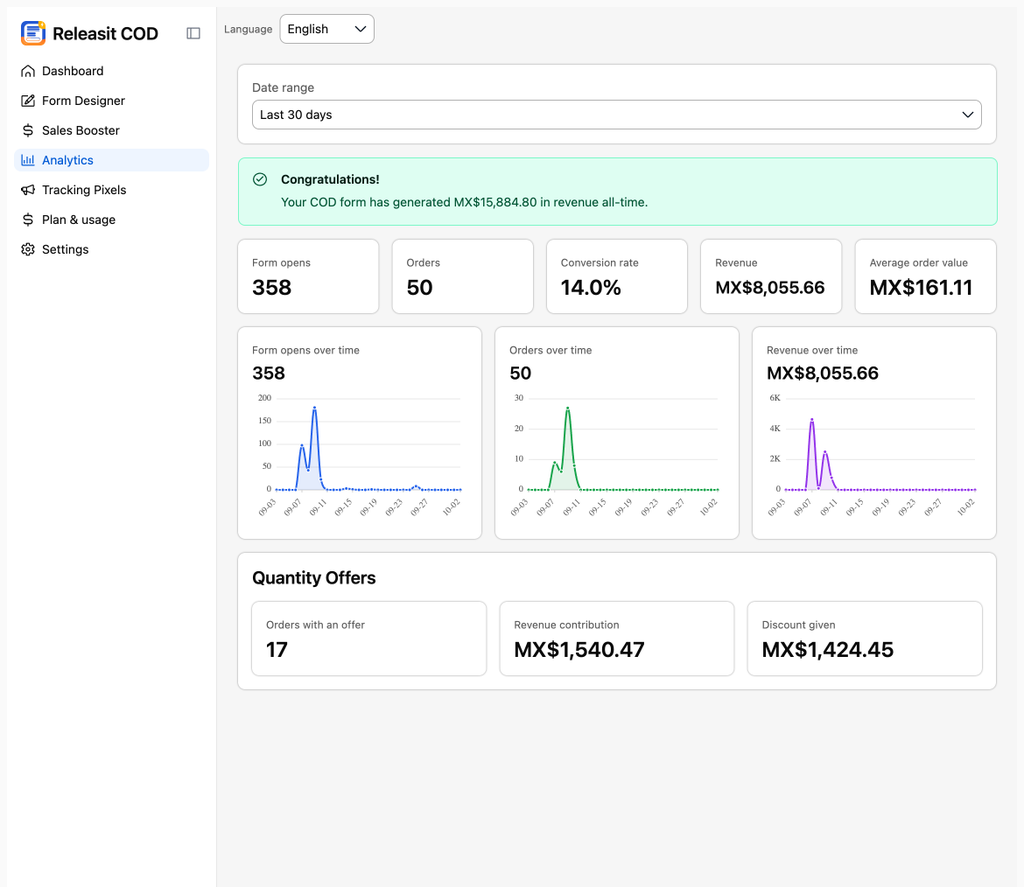
The metrics
Metric | What it counts |
|---|---|
Form views | Times a product page loaded with the button or the form visible. |
Opens | Times a customer opened the form (clicked the button). In embedded mode, opens and views are almost equal. |
Submissions | Times a customer clicked Complete order with the form filled in. |
Orders created | Orders Releasit created in Tiendanube. Can be lower than submissions if a product sold out between submission and creation. |
Revenue | Sum of the totals of the orders created in the period. |
Average order value | Revenue divided by orders created. |
Conversion | Orders created divided by opens. |
Filter by date
Choose the range above the metrics: today, 7 days, 30 days or a custom range.
Why my numbers do not match Tiendanube
- Tiendanube counts all orders in the store. Releasit counts only form orders.
- Time zones can move an order from one day to another.
How to use this data
- Low conversion with many opens: try fewer required fields. Read How to design your form.
- Many views and few opens: change the button text and color.
- Low average order value: add a quantity offer. Read Sales Booster.
Need help? Write to support+tienda@releas.it.
Updated on: 02/10/2026
Thank you!