
Plans, limits and billing on Tiendanube
Releasit COD Form has six plans. Your plan depends on how much you sell through the form each month, not on the number of orders or your store's total revenue. You start free and move up when your store grows.
The plans
Plan | Who it is for |
|---|---|
Free | To start selling cash on delivery. No cost. |
Lite | Growing stores. |
Plus | The most popular plan. |
Crecimiento | Established stores. |
Pro | Large operations. |
Ilimitado | No limit on sales through the form. |
Each plan has a limit on the amount sold through the form per month. Limits and prices are in your local currency and you see them in the Tiendanube App Store and in the app Dashboard.
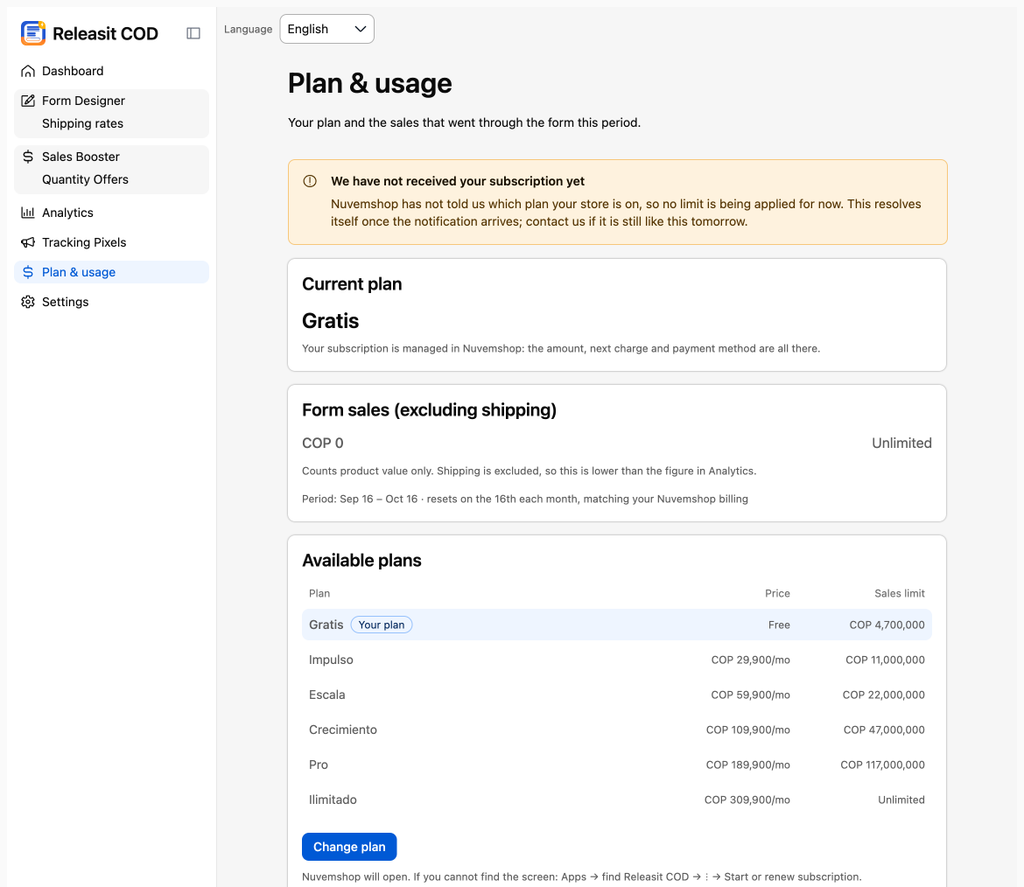
What counts toward the limit
The value of the products in the orders the form created in the period. Shipping does not count. Orders from the normal Tiendanube checkout do not count.
The period resets on the 16th of each month, the same as your Tiendanube billing. You see it in Plan & usage.
What happens when you reach the limit
In Plan & usage you see how much you sold in the period, and we email you when you get close to the limit. If you exceed it, the form stops creating new orders in Tiendanube: the orders wait in the app until you change plan or your period resets. Your customers can still buy through the normal Tiendanube checkout.
Free trial and grace period
- Paid plans include a 3-day trial. You can cancel before it ends and nothing is charged.
- If a payment fails, you have 3 days of grace to update your payment method before the app returns to the Free plan.
How you are billed
Tiendanube bills the subscription monthly together with your Tiendanube plan, in your local currency. Releasit does not store or process your card.
Change plan
- In your Tiendanube admin, go to Apps → Releasit COD Form.
- Click Change plan, or open the app page in the App Store.
- Choose the plan and confirm.
The change applies immediately. If you downgrade and you have already exceeded the new plan's limit in the current month, the form pauses until the next month.
Cancel
You can move to the Free plan at any time or uninstall the app. Read How to uninstall the app and what happens to your data.
Need help? Write to support+tienda@releas.it.
Updated on: 09/10/2026
Thank you!